
Monizze Pay — Pay with your phone.
Your card can think about its new life.
Activate Monizze Pay and pay wherever your Monizze card is accepted. Without taking out your card, without a PIN, without any hassle.
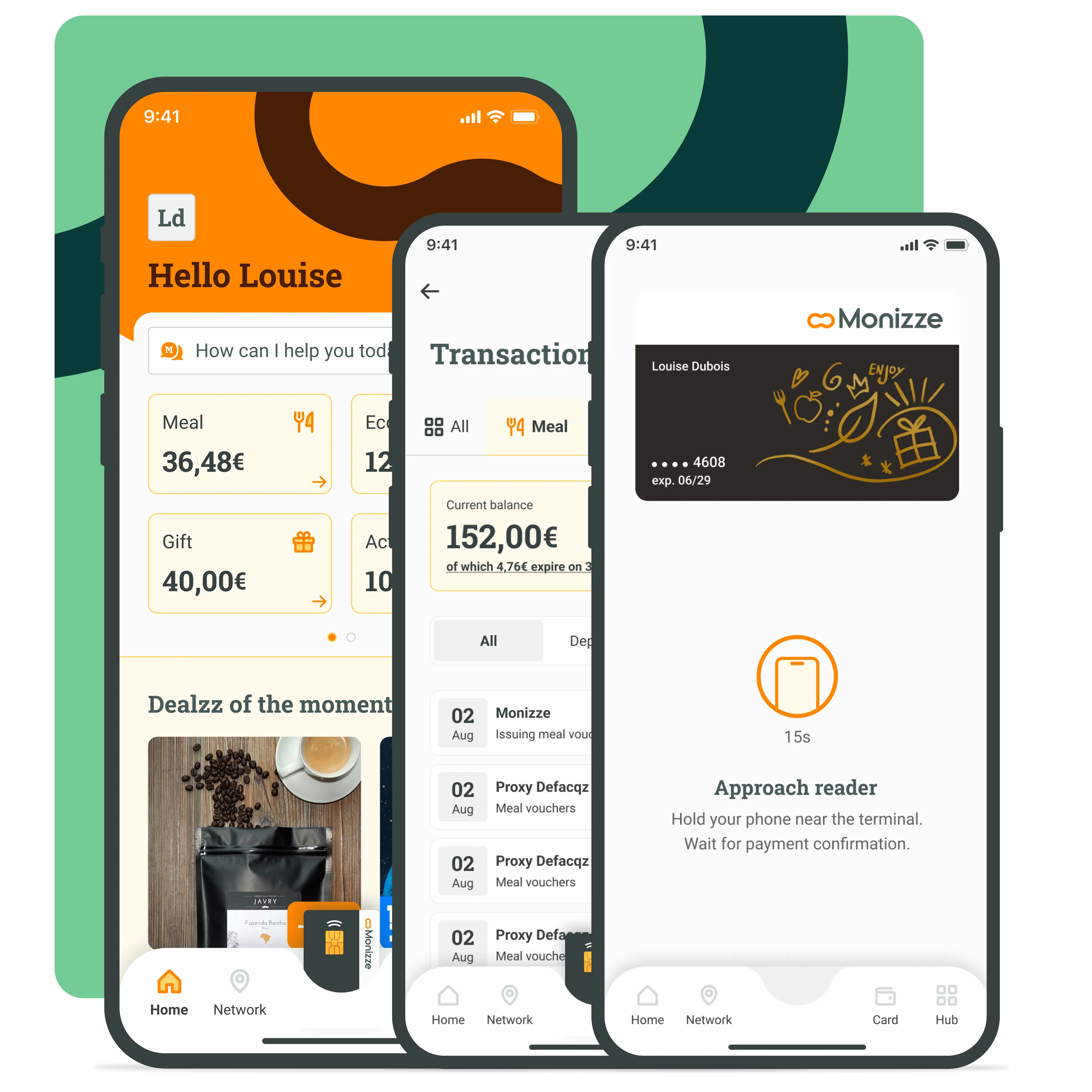
How does it work?
Your phone becomes your Monizze card.
No more searching for your card. No stress if it's been left at home. Monizze Pay is the freedom to pay with what's always in your pocket: your phone.
Monizze Pay works exactly like your physical card, directly from your Monizze app.
If it works with a card, it works with a phone.
- Meal vouchers, eco-cheques and gift vouchers
- In all affiliated Monizze shops and restaurants
- No PIN. Your app handles it (code or biometrics)
- Pay even without an internet connection
Activation guide
Activate Monizze Pay in 1 minute
Requirements
- iOS 17.4 or Android v8 or higher
- NFC enabled on your phone
- Monizze app installed and up to date
- Authentication set up (code or Face ID / fingerprint)
Open your Monizze app
Go to the Card page or follow the invitation to activate Monizze Pay on your home screen.
Activate Monizze Pay
Click on "Monizze Pay" and activate. Accept the general terms and conditions and wait a few seconds for confirmation. If not already done, the app will prompt you to set up authentication via Face ID, fingerprint or code.
Done!
You can now pay with your phone across the entire Monizze network.
Not Google Pay or Apple Pay
In store
How to pay in store?
- 1Tell the cashier which type of voucher you want to use
- 2Open your Monizze app (code or biometrics)
- 3Tap the image of your card in the bottom menu (iPhone users: then tap "Pay" when you're ready)
- 4Hold your phone near the payment terminal
- 5Confirmation screen: done
No double-click
Android tip
iOS tip
Good to know
Not Google Pay. Not Apple Pay. Just Monizze.
A Belgian solution, designed for the entire ecosystem.
We could have gone through Google Pay or Apple Pay, which generally work via Visa and Mastercard networks. But we preferred to develop our own system: Monizze Pay.
Monizze Pay works via our Belgian payment network. This choice is our way of meeting our users' needs while protecting merchants.
- 100% Belgian: developed and operated in Belgium
- No international network fees: no Visa, no Mastercard
- The same pricing conditions for merchants, with no added costs
Same network, same shops
If your Monizze card works, so does your phone.
Monizze is the only voucher issuer in Belgium that lets you pay with your phone across its entire affiliated acceptance network, supermarkets included. Monizze Pay runs on the same network as your card: no list to check, no "sorry, not here".
Supermarkets
For your weekly shop.
Bakeries and grocers
The shops in your neighbourhood.
Restaurants and sandwich bars
For your lunch break.
Local shops
Butcher, cheesemonger, deli…
FAQ
Frequently asked questions
Is Monizze Pay free?
Is Monizze Pay free?
Do I need to keep my physical card?
Do I need to keep my physical card?
Can I add my Monizze card to Apple Pay or Google Wallet?
Can I add my Monizze card to Apple Pay or Google Wallet?
Why doesn't Monizze Pay use Apple Pay or Google Pay?
Why doesn't Monizze Pay use Apple Pay or Google Pay?
How do I pay faster with Monizze Pay?
How do I pay faster with Monizze Pay?
Create a shortcut to Monizze Pay by adding the Monizze Pay widget to your smartphone. The widget opens the app directly on the Monizze Pay screen: all that's left is to hold your phone near the terminal. Even faster at the checkout!
Before you start, make sure Monizze Pay is activated in the app (under "Card") and your Monizze app is up to date.
On iPhone
- Touch and hold the lock screen, then tap "Customise".
- Choose the lock screen, then tap the widget area below the time.
- Search for "Monizze" and select the Monizze widget. The widget itself shows "Monizze Pay".
- Tap "Done" to save.
On Android: add the Monizze widget from your phone's widget menu. The exact steps depend on the brand and model.
At the checkout: tap the widget, confirm with Face ID, your fingerprint or your code, then hold your phone near the terminal.
I have several Monizze accounts. Can I use Monizze Pay on each of them?
I have several Monizze accounts. Can I use Monizze Pay on each of them?
Is my phone compatible?
Is my phone compatible?
Can I pay offline?
Can I pay offline?
What if it doesn't work?
What if it doesn't work?

Ready to pay with your phone?
Download the Monizze app, update it and activate Monizze Pay in under a minute.